Nine layers for running AI safely: a framework for architects
Most AI projects don’t fail because the model was wrong. They fail because nobody could say who approved the agent, what data it used, what it cost, or whether it still works as it did at launch. A proof of concept can skip those questions. A production service can’t.
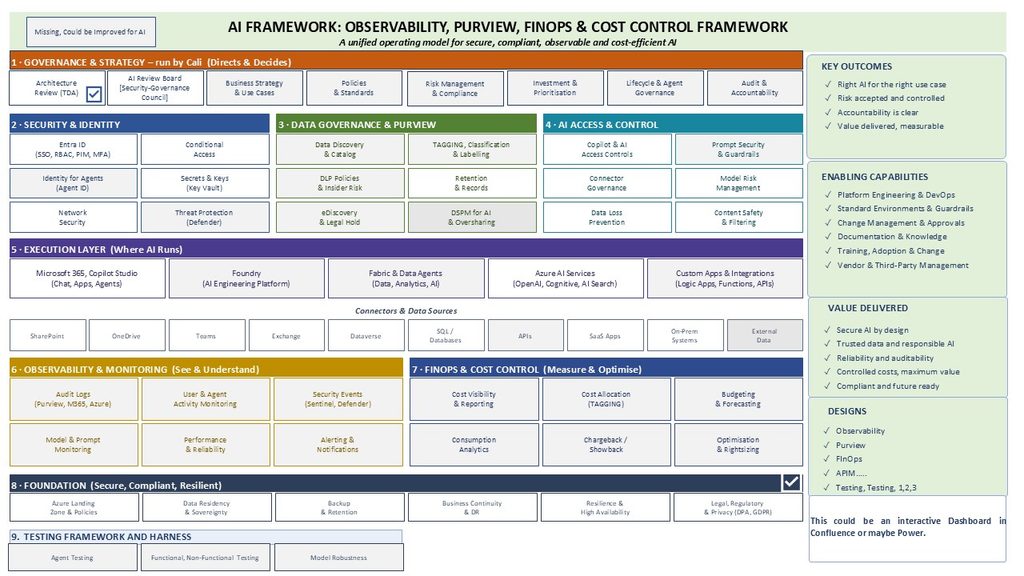
We use a one-page framework to make sure none of them gets missed. It has nine layers. Each one answers a single question, and together they cover an AI capability from the idea to the invoice. It’s written for Microsoft-based estates, but the structure works on any platform.
How to read it
Read it top-down for control and bottom-up for evidence:
- Top-down: governance sets the rules, the control layers (security, data, access) enforce them, and the execution layer is where AI actually runs.
- Bottom-up: observability and cost data flow back up to governance, so decisions are based on evidence rather than opinion.
- Underneath: the foundation layer supports everything, and testing proves each change before it ships.
In one line: governance directs, controls enforce, observability evidences, FinOps optimises, value delivers.
Layer 1 — Governance & Strategy: who decides?
This is where decisions are made. It covers the architecture review board, the AI risk council, business strategy and use cases, policies, investment and prioritisation, lifecycle governance, and accountability.
The key idea is that governance is a process to follow, not a meeting to pass. Every agent follows the same gated lifecycle: idea, prototype, sandbox, pilot, production, then ongoing operation. Each gate has a clear approver and clear evidence. Use cases are scored on business impact, technical feasibility, compliance risk and scalability, so priorities aren’t set by whoever speaks loudest.
For the architect: if you can’t name the approver for your agent’s next gate, you’re not ready for it.
Layer 2 — Security & Identity: who and what can get in?
This is defence in depth, applied to AI. Identity comes first: single sign-on, role-based access, just-in-time privilege and conditional access. Then come private networking, keys held by the organisation, and threat protection.
What’s new is identity for agents. An agent is a security principal like any other. It needs its own identity, a named human owner, least-privilege permissions, and access reviews like any privileged account. When an agent acts on a user’s behalf, the audit trail should still show which human it was acting for.
For the architect: treat every agent as a new privileged account, because that’s what it is.
Layer 3 — Data Governance: what data can AI see, and can we prove it?
AI is only as trustworthy as the data it reads. This layer finds out where sensitive data lives, labels it, stops it leaking, keeps records for the right length of time, and makes them available for legal holds and investigations.
Two ideas matter most:
- Classify at the source. Labels applied where data is created travel downstream with it, so they’re still in place when AI reads that data.
- Watch for oversharing. The first thing an AI assistant exposes is data that was already too widely shared. Assess and fix oversharing before you switch AI on.
Ownership is deliberately spread out. Privacy, records, legal, security and data teams each own their own part. No single team can credibly own all of it.
For the architect: your design should answer “what did this AI touch?” without anyone having to work it out by hand.
Layer 4 — AI Access & Control: how do we use AI safely?
This layer controls how people and agents reach models and tools. The main pattern is an AI gateway in front of every model, tool and grounding call the organisation owns. In one place, the gateway:
- checks identity;
- caps token usage for each agent;
- screens prompts and responses;
- records which agent used what, for cost attribution;
- routes around failures;
- logs the traffic.
The layer also covers prompt security (defending against prompt injection), governance of connectors, and model risk management, meaning an approved list of models with owners and retirement dates.
Know your boundary. Built-in assistants such as Microsoft 365 Copilot don’t pass through your gateway. Govern them through data controls instead.
For the architect: if a call to a model you own doesn’t pass through the gateway, you can’t limit it, measure it or explain it.
Layer 5 — Execution: where does AI actually run?
These are the platforms that do the work: productivity copilots, low-code and code-first agent platforms, data and analytics agents, AI services, and custom integrations. They draw on connectors to your content and systems.
A useful way to think about use is ask, build, delegate:
- Ask: someone chats with an assistant.
- Build: a team creates an agent for a defined workflow.
- Delegate: someone hands a multi-step task to an agent and reviews the result.
The more autonomy, the stronger the human approval step needs to be.
Underneath all three sits a context layer: shared, permission-aware access to documents, business data and knowledge. Without it, every agent team rebuilds its own data plumbing, and each copy is another thing to secure and keep up to date.
For the architect: design the context once and reuse it across agents. Don’t let each agent keep a private copy of the truth.
Layer 6 — Observability & Monitoring: can we see what is happening?
Normal monitoring asks whether the request succeeded and how fast. For AI, that’s not enough. A fast, successful answer can still be wrong, ungrounded or unsafe. So this layer watches two things:
- Operational health: latency, errors, throttling and tokens.
- Behavioural quality: is the answer grounded, relevant and safe, and did the agent use its tools correctly?
We send each kind of signal to the tool that answers its question:
| Question | Where the signal goes |
|---|---|
| How did the system behave? | Application monitoring |
| What data did it touch? | Data governance tooling |
| Is anyone attacking it? | The security operations centre |
| What agents do we have? | A single agent registry |
Use one open standard (OpenTelemetry) for telemetry, so a trace looks the same whichever platform produced it.
For the architect: observability is a prerequisite for cost control, not a separate workstream. You can’t manage spend you can’t see.
Layer 7 — FinOps & Cost Control: what does it cost, and who pays?
AI cost scales with usage. Each call costs almost nothing, but volume adds up quickly, and a badly designed agent can cost five to ten times more than a well-designed one.
This layer tags spend, sets budgets and alerts, attributes cost to individual agents and teams, and drives optimisation. There are usually two billing streams:
- metered cloud consumption;
- per-user licences and credits for assistant platforms.
Neither admin console shows both, so bring them together in one cost model. The standard control is the same everywhere: a budget, an alert at 80% of it, and a hard stop at the limit.
For the architect: the cheapest tokens are the ones you design out. Keep prompts tight, limit retrieved context, cap response length and use smaller models where they’re good enough.
Layer 8 — Foundation: is the ground solid?
This is the landing zone every workload inherits:
- private networking;
- policy-enforced regions and data residency;
- backup, disaster recovery and high availability;
- the legal, regulatory and privacy obligations the whole stack must meet.
Get this right once, as infrastructure as code, and every new agent starts compliant instead of fixing it later.
For the architect: if a new AI workload needs a special network or policy exception, question the design before approving the exception.
Layer 9 — Testing Framework & Harness: can we prove it works — and keeps working?
AI output varies, so you can’t test it once and move on. This layer keeps curated test sets: golden question-and-answer pairs, adversarial “red team” prompts and robustness checks. They all run through one evaluation harness on every change to a prompt, model, tool or knowledge source.
Decide in advance which results are hard stops and which are watch items. Feed failures from production back into the test sets. Model retirements are the change teams most often forget: when a model version is retired, the replacement needs a full re-test, not a quiet swap.
For the architect: treat evaluation results as release evidence, the same as unit tests are for code.
What this adds up to
The layers aren’t new ideas. Identity, data protection, monitoring and cost control are familiar disciplines. The value comes from putting them on one page, so that for any AI capability you can ask nine questions and expect nine clear answers:
- Who decides?
- Who can get in?
- What data can it see?
- How is its use controlled?
- Where does it run?
- Can we see what it’s doing?
- What does it cost, and who pays?
- Is the ground solid?
- Can we prove it works?
If any answer is “we’re not sure”, you’ve found your next piece of design work.