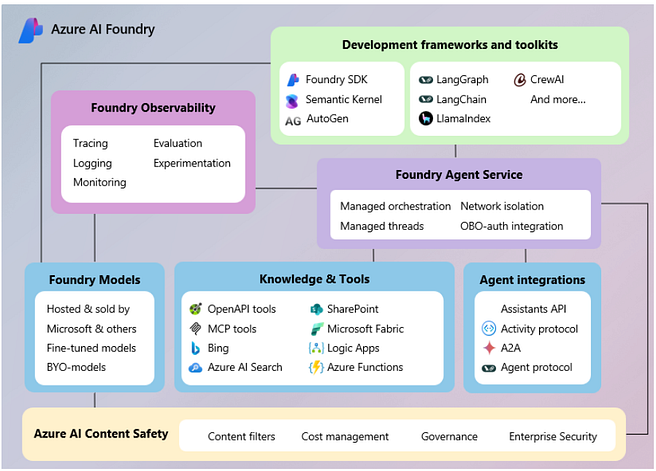
Microsoft’s AI Foundry Agents offer a declarative, configuration-first model for building agents. The architecture, outlined in Microsoft Learn, revolves around:
- Agent Definition — YAML or JSON definition of roles, tools, and skills.
- Memory & State — Persistent context via Cosmos DB, Azure Cognitive Search, or custom backends.
- Execution Fabric — Azure Functions and Logic Apps to bind external tools.
- Governance & Monitoring — Azure Monitor, Policy, and RBAC integration.
Why Azure AI Foundry matters
Azure positions agents as low-code managed entities. Instead of hand-crafting orchestration, you declare an agent and let the Foundry runtime manage execution and scaling.
Pros:
- Strong developer productivity with declarative configs.
- Easy integration with Azure OpenAI and Cognitive Services.
- Enterprise-grade governance with Azure AD + RBAC.
Cons:
- Opinionated stack; less flexibility for complex agent flows.
- Steeper learning curve if you move beyond the portal into custom agents.
How to start:
- Navigate to Azure AI Foundry → Agents tab.
- Define an agent role and connect to Azure OpenAI deployment.
- Attach tools using Azure Functions or REST APIs.
- Deploy and monitor using Azure Monitor dashboards.
- Check — https://learn.microsoft.com/en-us/azure/ai-foundry/agents/quickstart?pivots=ai-foundry-portal